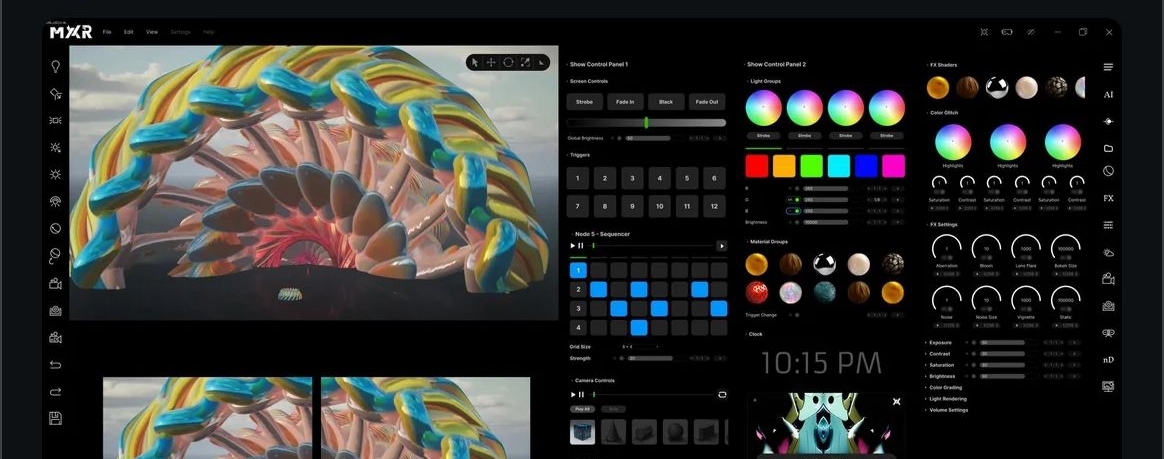

If you’ve been following the development of the MXR App, you know that the team is dedicated to refining the live performance experience. After an intense period of testing and live shows throughout late 2025, MXR Founder Eric just dropped a major update on the subreddit regarding the future of the platform.
The verdict? A major UI redesign is currently underway.
Based on direct feedback from operators in the field, the team is retooling the interface to make it more intuitive, linear, and responsive. While the design is still a work in progress, here is a breakdown of the exciting features currently on the drawing board.
1. Enhanced Show Control
The biggest takeaway from the recent live testing seems to be usability. When you are in the heat of a performance, you can't be hunting for tiny pixels.
- New Control Tabs: Two new tabs are being introduced specifically for "Show Control."
- Larger Interface: Expect large buttons designed to make operating MXR significantly easier during live sets.
- Better Sliders: Critical parameters are getting larger sliders for more precise control.
2. A New Way to Sequence
One of the most requested workflow improvements is being addressed with a New Sequencer Node. This addition aims to make programming more linear. Crucially, it is designed to allow changes "on the fly," giving VJs and operators the flexibility to adapt to the music without breaking their flow.
3. Advanced Visual Manipulation
The update isn't just about buttons; it’s about what you can put on the screen.
- Time Dilation: A fascinating new feature for ramping animation speeds, allowing for dynamic tempo changes.
- Emergency/Accent Controls: Dedicated controls for fading to (or strobing) Black or White—essential tools for drops and transitions.
- Preview Monitors: While this is still "TBD" based on performance impact, the team is actively exploring the addition of in-app preview monitors.
4. Grouping for Power Users
For those running complex setups, organization is key. The redesign proposes a heavy focus on grouping:
- Light Groups: Dedicated controls for managing clusters of lights.
- Trigger Groups: Manage visibility or FX across multiple elements simultaneously.
- Material Groups: Trigger material changes across a whole group at once.
The "Cutting Room Floor" Disclaimer
Eric was careful to note that this design is currently a work in progress. The team is prioritizing performance and stability, meaning some of these features might not make the final cut if they bog down the system.
We Need Your Feedback!
The MXR team is looking for community input to decide what to prioritize first. If you are an MXR user, head over to the r/MXR_App subreddit and let them know which of these features matters most to your workflow.
Stay tuned for more updates as the redesign progresses!






Top comments (0)